Full Source Code > The complete standalone
index.htmlused in this overlay is available here: > https://gist.github.com/MarsuvesVex/51bc48490ca9e7700994e5ba16cde50b
This post documents the original HTML-based lower-third overlay used in OBS before it was migrated into a Next.js-powered overlay system.
The goal was simple:
- Predictable sizing in OBS
- Zero layout shift
- Smooth, readable animation
- Fully self-contained (HTML + CSS + JS)
Overview
The lower-third consists of four visual layers:
- Icon block (fixed 90×90)
- Animated bar (top + bottom border only)
- Primary title text
- Secondary subtitle text
All animation timing is orchestrated via GSAP TimelineMax, allowing the entire sequence to be played forward and reversed cleanly.

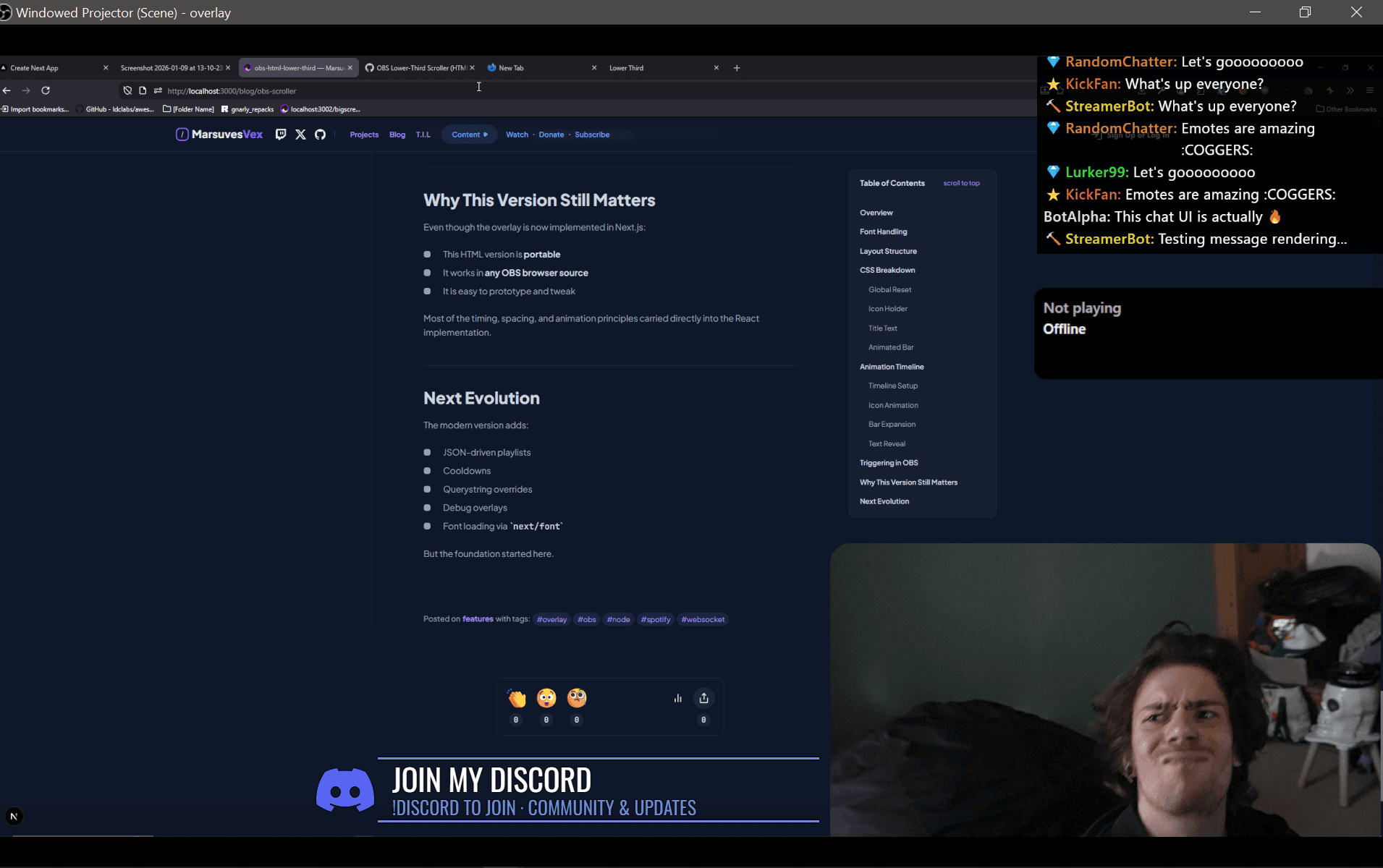
The end result looking something like this:
Font Handling
The overlay uses Oswald, loaded directly from Google Fonts:
<link rel="stylesheet" href="https://fonts.googleapis.com/css?family=Oswald" />
Using a hosted font avoids system font inconsistencies across OBS machines.
OBS caches browser sources aggressively. Always hard-refresh or change the URL when testing font changes.
Layout Structure
At a high level:
<div class="title">
  <div class="icon-holder"><img /></div>
  <h2>Title</h2>
  <h3>Subtitle</h3>
  <div class="title-inner"></div>
</div>
Key constraints:
.titlehas a fixed width (700px).icon-holdernever affects layout flow- Text is absolutely positioned to prevent reflow
CSS Breakdown
Global Reset
html,
body {
  margin: 0;
  padding: 0;
  width: 100%;
  height: 100%;
  background: transparent;
  overflow: hidden;
}
This ensures OBS sees only the overlay itself.
Icon Holder
.icon-holder {
  position: absolute;
  width: 90px;
  height: 90px;
  transform: scale(0);
  bottom: -10px;
}
The icon starts hidden and is scaled + rotated in.
Title Text
.title h2,
.title h3 {
  opacity: 0;
  transform: translateX(-20px);
}
Text is animated after the bar finishes expanding to avoid jitter.
A subtle drop shadow improves readability on bright backgrounds.
Animated Bar
.title-inner {
  width: 0vw;
  height: 90px;
  border-top: 3px solid #7289da;
  border-bottom: 3px solid #7289da;
  position: absolute;
  left: 90px;
}
Only the top and bottom borders are drawn. Left/right borders were intentionally removed to avoid boxing the content.
Animation Timeline
GSAP controls the entire lifecycle:
- Icon scales + rotates in
- Bar expands horizontally
- Text fades and slides in
- Hold duration
- Text fades out
- Bar collapses
- Entire animation reverses
Timeline Setup
var tl = new TimelineMax({
  repeat: 0,
  onComplete: reverseFunction,
});
The timeline is played forward, then reversed to guarantee symmetry.
Icon Animation
tl.to(iconHolder, 1.2, {
  scale: 1,
  rotation: -180,
  ease: Power1.easeInOut,
});
The counter-rotation on the image keeps it visually upright.
Bar Expansion
tl.to(title, 2.5, {
  width: 700,
  ease: Power1.easeInOut,
});
The width matches the .title container exactly to avoid subpixel drift.
Text Reveal
tl.to(h2, 0.35, { opacity: 1, x: 0 });
tl.to(h3, 0.35, { opacity: 1, x: 0 });
Text is intentionally fast to keep the overlay feeling responsive.
Triggering in OBS
The animation is restarted every 20 seconds:
setInterval(function () {
  tl.restart();
}, 20000);
This was later replaced with cooldown-based logic in the Next.js version.
Why This Version Still Matters
Even though the overlay is now implemented in Next.js:
- This HTML version is portable
- It works in any OBS browser source
- It is easy to prototype and tweak
Most of the timing, spacing, and animation principles carried directly into the React implementation.
Next Evolution
The modern version adds:
- JSON-driven playlists
- Cooldowns
- Querystring overrides
- Debug overlays
- Font loading via
next/font
But the foundation started here.